SET_TEXTRewrite copy
Headlines, buttons, paragraphs. The exact new text, not “make it punchier”.
For web agencies building with AI coding agents
Clients show their changes directly on your staging site. You get a structured ChangeSet that developers and coding agents can implement without a single clarification email.
Two-minute demo in your browser. No sign-up. Free for one site.
See it work
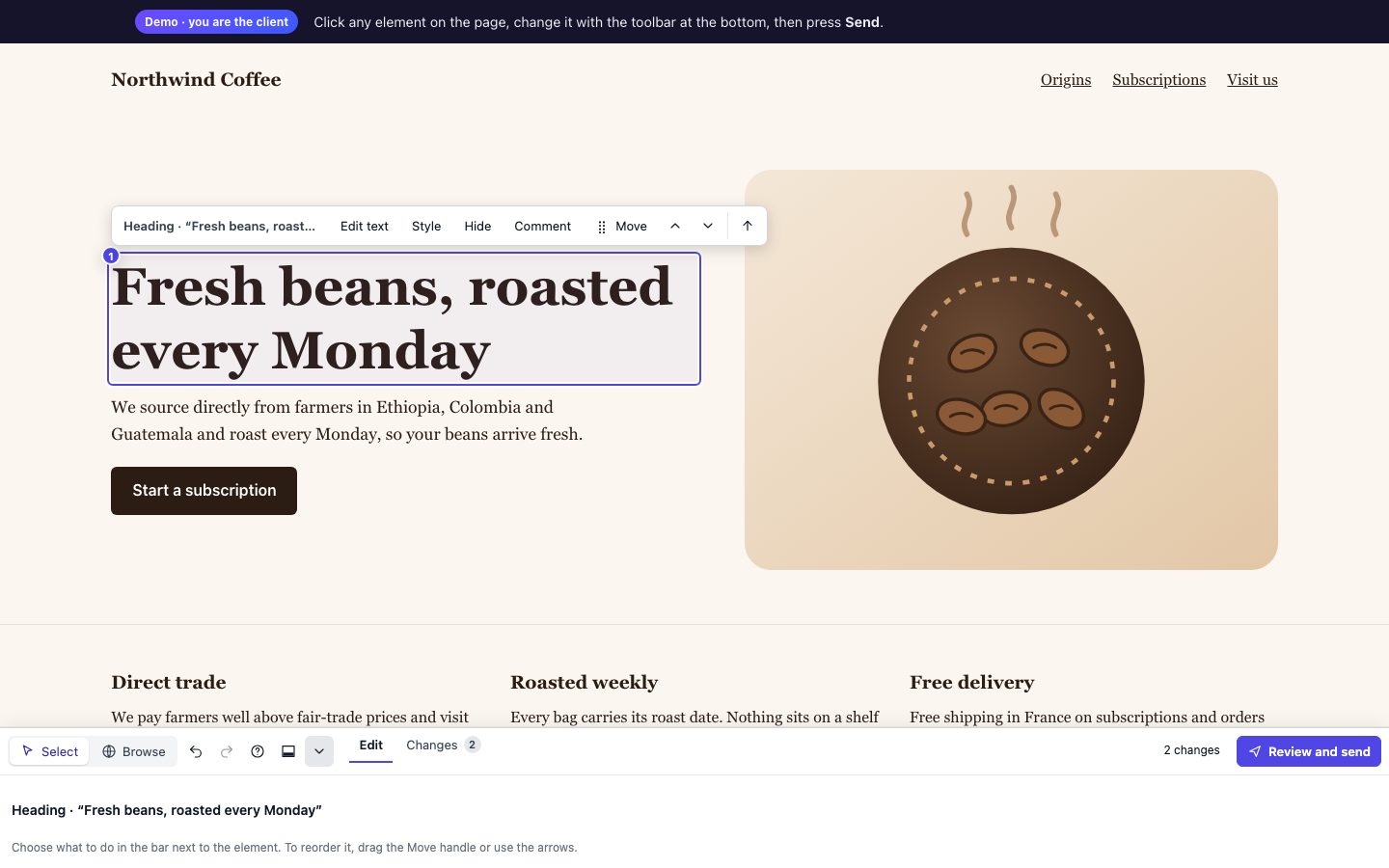
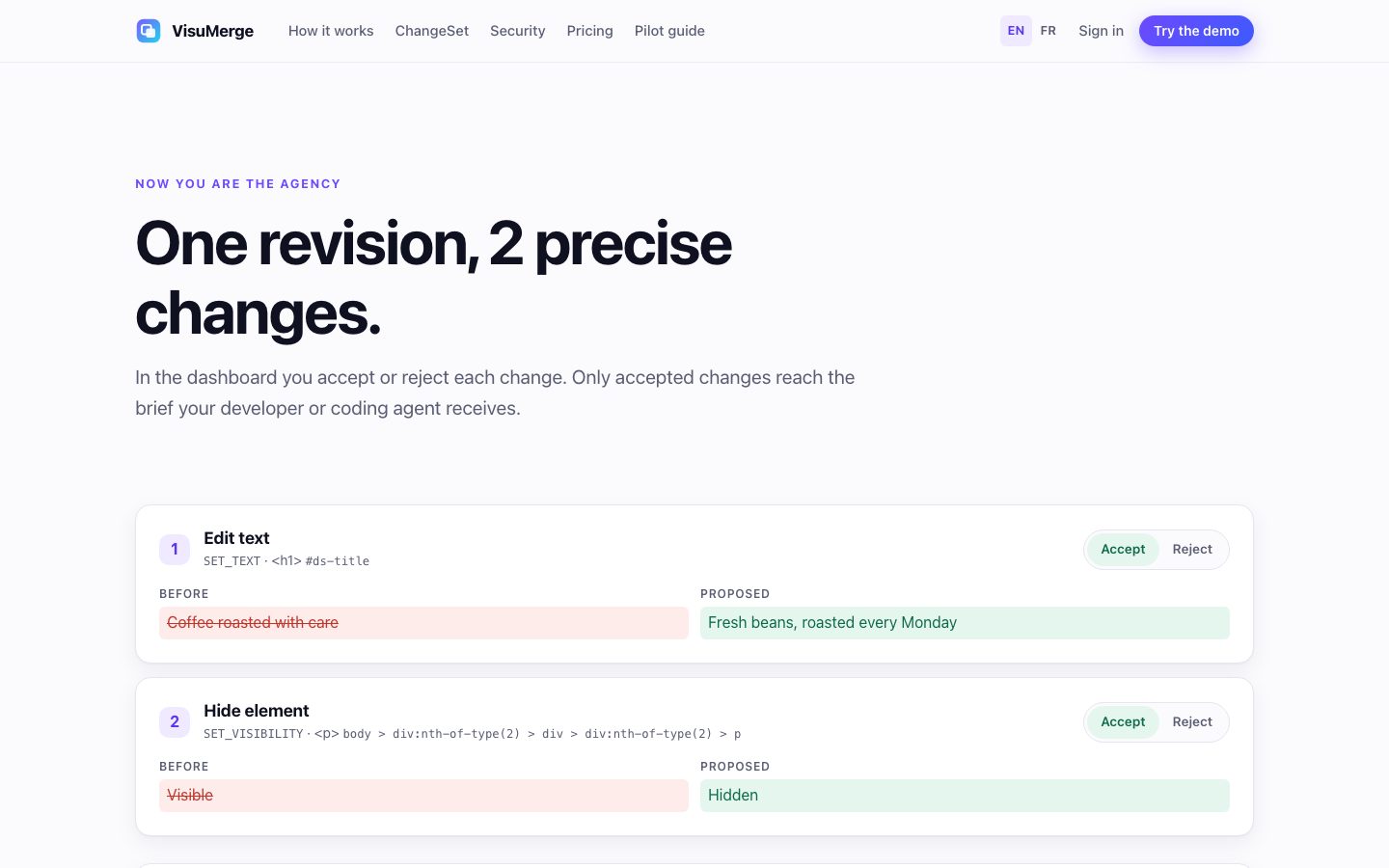
These are screenshots of the live demo: a client edits the site of a fictional coffee roaster, then the agency reviews what was sent.
The problem
“Can the button pop more?” “Change the second paragraph.” Each round costs a meeting, a screenshot hunt and a rewrite into tickets, and it all comes out of your margin.
SET_STYLE Start free trial · backgroundrgb(17, 24, 39) #7c5cffSET_TEXT h1Plans for every team Simple pricing. Cancel anytime.SET_VISIBILITY Promo bannerVisible HiddenAn example built from the demo: one revision, three changes, one brief.
How it works
Add one script tag to your staging site, create a project and share a private link. Clients need no account and nothing to install.
They click any element and show what they want: new copy, a colour, an image, a hidden section. Undo and redo included.
Every request arrives as a separate, typed change with the element, the before value and the proposed value.
Copy an implementation brief for Claude Code, Cursor or Codex, or download the JSON ChangeSet.
Deliberately focused
Not a page builder. Clients propose; your team decides and implements, in the source code.
SET_TEXTHeadlines, buttons, paragraphs. The exact new text, not “make it punchier”.
SET_STYLEColour, size, weight, alignment, spacing, radius, from an allowlist of safe properties.
REPLACE_IMAGEPoint to the new image URL and preview it in place before sending.
SET_VISIBILITYRemove what should go and see the page without it.
MOVE_BLOCKMove a section or a card up or down among its neighbours, by drag or with the arrows, and see the new order in place.
COMMENTSelect any block and say what feels wrong. The remark stays attached to that element and nothing on the page changes.
The output
A ChangeSet is the list of changes you accepted. Each one names the exact element (tag, stable attributes, selector, place in the page, text) and gives the before and after values.
### 2. Edit text
- Page: `https://staging.acme.dev/pricing`
- Element: `h1`, selector `#pricing-hero h1`

Current text:
```text
Plans for every team
```
Requested text:
```text
Simple pricing. Cancel anytime.
```
{
  "operation": "SET_STYLE",
  "target": {
    "tagName": "a",
    "cssSelector": "#pricing-hero .cta",
    "textFingerprint": "Start free trial"
  },
  "beforeValue": { "property": "background-color", "value": "rgb(17, 24, 39)" },
  "proposedValue": { "property": "background-color", "value": "#7c5cff" }
}
Fits your workflow
Keep your tracker and your coding agent. VisuMerge sends each reviewed revision to them, so nobody copies a brief by hand.
A submitted revision opens an issue with the implementation brief. Sign in to connect, or paste a token for a self-managed GitLab.
The same revision becomes a row in your database, or a page under the one you choose.
Open an issue for every review, or only when changes are refused. Each decision is added to that issue.
Send events to any tool or to your own app, as JSON signed with HMAC-SHA256, with automatic retries.
Each issue starts with a prompt written for the tool you use: Claude Code, Codex, Copilot, Cursor, Gemini CLI, Windsurf, Aider and more.
Claude Code, Cursor and other agents can list your projects, read an accepted revision and record a decision. Ask us about it during the pilot.
Integrations are part of Pro. Jira and Slack are not supported. VisuMerge never touches your code: your agent changes it, and you review the result.
Everyone in the loop
How it differs
Screenshots, videos and design comments are good for talking. When the next step is a developer or a coding agent changing the code, the request has to be exact.
Good for bug reports and quick remarks. The request usually arrives as a picture and a sentence, and the developer works out the new value.
When to choose it. Pick VisuMerge when clients ask for new copy, colours, images or a different order.
Good for explaining context. Someone still replays the video and writes the tasks, and no one can accept it line by line.
When to choose it. Pick VisuMerge when you need a list you can accept or refuse change by change.
Good before the site exists. Once a staging site is up, the real page is the better place to react to.
When to choose it. Pick VisuMerge once there is a staging site your client can open.
VisuMerge is not a bug tracker: it records no console logs and no session replays. Keep your tracker for bugs and use VisuMerge for revision rounds.
Security by design
The review UI lives in a Shadow DOM and cleans up after itself. Your site’s CSS stays yours.
Edits change the browser preview. Nothing touches your code, repository or servers.
Six typed operations, schema-validated. No eval, no injected scripts, no free-form CSS.
Random review tokens, stored hashed, scoped to one hostname and to sites that carry your agency’s install key, revocable, kept out of server logs.
Client text is fenced as data so it cannot pose as instructions to your coding agent.
No cookies, form values or storage are read from the reviewed page.
Setup
Add the tag to your staging site, or install the connector on a WordPress or WooCommerce site. The widget stays inert for everyone else: it only wakes up when a page is opened with a valid review link. PrestaShop sites are recognised too, so the brief says where to change each item.
<script src="https://visumerge.app/review-widget.js" async></script>
Questions
No. They open a private review link and edit the page. Nothing to install, no sign-up.
No. Edits only change what the browser shows during the review, and the widget puts everything back when the reviewer leaves. Nothing touches your code, your repository or your servers.
It is built for staging sites. A review link works only on the hostname you registered, and only on a site that carries your agency’s install key.
Any site that can load one script tag, plus a connector for WordPress and WooCommerce. A page that a framework such as React or Vue redraws can overwrite the preview. The preview is a proposal, and nothing is saved on the site.
The brief wraps everything a client wrote in a fenced block marked as data, so it cannot pose as an instruction. The MCP server does the same with what it returns.
GitHub and GitLab issues, Notion tasks, and a signed webhook for anything else, on the Pro plan. Jira and Slack are not supported.
Only what a change needs: the element, its text or style, and a fingerprint to find it again. No cookies, form values or storage are read, and secret-looking parts of addresses are removed.
Free for one site. Move to Pro when your projects multiply. Clients you invite to review are always free. The pricing page has the details.
We’re onboarding a small group of agencies. You get hands-on setup; we learn from a real client project.